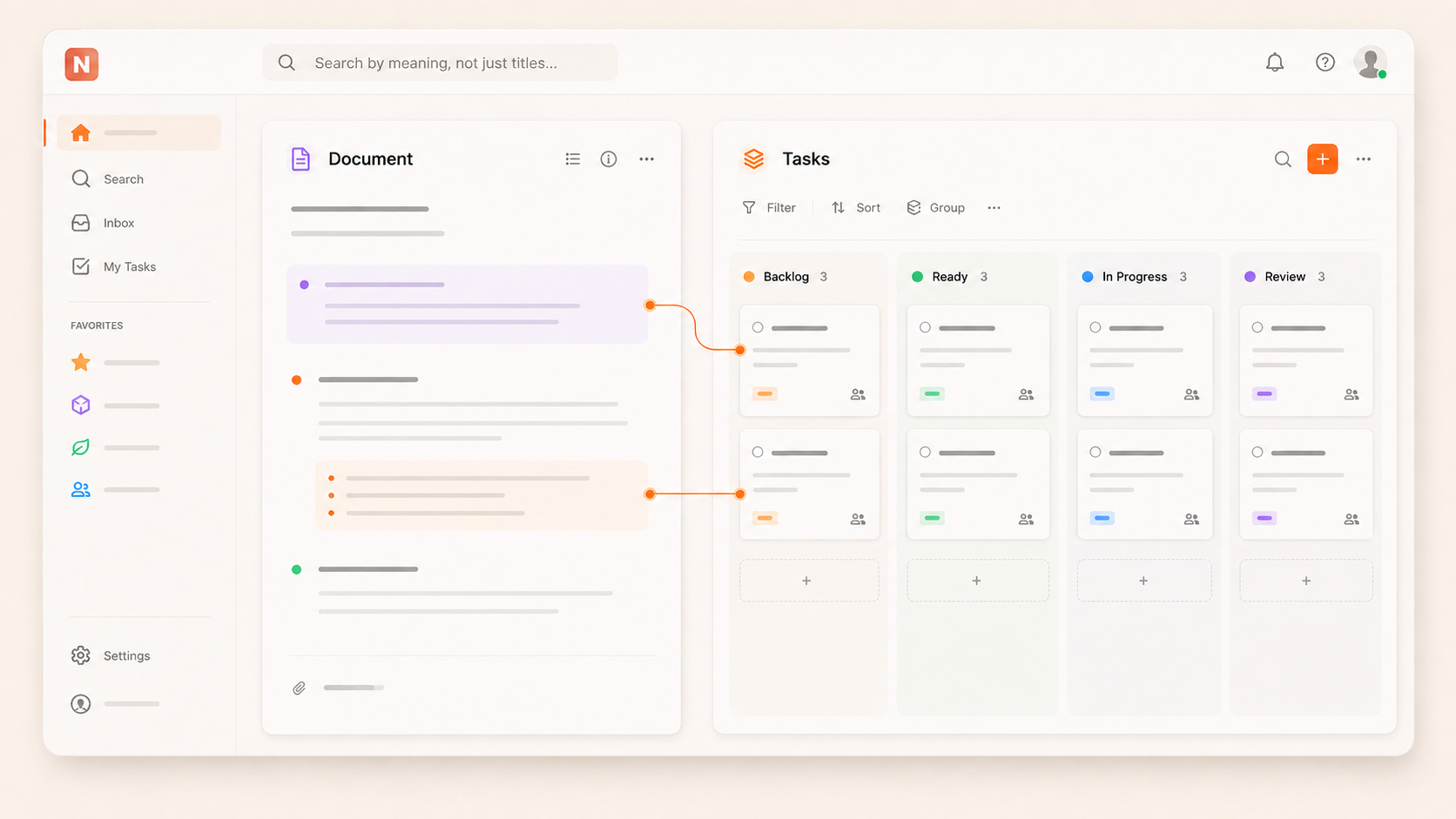
Project documentation and task management serve different but complementary purposes. A specification lays out what a team plans to build. Research documents show what informed those plans. Decision records explain why one direction was chosen over another. Tasks and issues answer practical questions: What needs to get done? Who is handling it? What is still outstanding?
These serve distinct functions and usually require distinct formats, but they are closely related. When documentation resides in one tool and task tracking lives in another, team members must switch between systems to connect current work with its background. Keeping both in a single workspace means context and action stay linked, without forcing all information into either a document or a task format.
Documentation explains the work
Project documentation provides context so teams can understand what they are working on. Typical examples include:
Project briefs
Specifications
Research summaries
Meeting notes
Plans
Decision records
Reference materials
These documents require space for detail. For example, a specification may list requirements, constraints, diagrams, and the reasoning for choices. Research might bring together multiple sources. Reducing all this to a task title or small set of structured fields misses most of the context. Documents are where reasoning, nuance, and history live.
Tasks track what needs to happen
Tasks and issues are the units of tracked work. They change status, are assigned to people, receive priorities, and may have deadlines. For a product launch, typical tasks might be:
Review final campaign copy
Fix a bug found during testing
Prepare launch assets
Update onboarding materials
Publish the release
Tasks should be clear and actionable, but they do not need to include all background material. Instead, they focus on what work is required and how it is progressing. This is why blending documentation and tasks into one format is rarely effective. Each is valuable precisely because it handles a different job.
Tasks often make more sense with the surrounding context
Suppose a team member gets assigned a task titled:
Update the account settings flow
The task lets them know what to do, but raises questions: Why is the change needed? What problem does it address? What requirements exist? Was there a past decision or compromise affecting implementation?
These details may be spelled out in a specification, a meeting note, or a decision record. Storing documentation in the same workspace makes it easier for someone to move from a task to the wider context as needed. The task stays focused on action, while the documentation remains a reference for background and reasoning.
The relationship between documentation and tasks goes both ways. Documentation produces work to be tracked:
A product spec might generate implementation tasks
Research could reveal issues to investigate
Meeting notes may capture follow-up assignments
Decisions can trigger additional changes or reviews
A launch plan typically leads to a series of deliverables, each with its own owner and deadline
If documents and tracked work exist in separate tools, someone needs to keep the connection clear. Keeping everything in the same workspace lets teams create tasks from documents, or link work items to the references that matter, without making documentation itself into a task list.
Project context and project status answer different questions
Task lists are helpful for seeing:
What remains to be done?
A project brief answers:
What are we trying to achieve?
A specification is the source for:
What exactly are we building?
A decision record explains:
Why did we pick this approach?
These are parallel views of the same project. No single view can do everything. In a workspace that accommodates both documentation and tracked work, team members can consult the resource that fits their immediate need: live status, deeper understanding, or the history behind choices.
Keeping them together can reduce unnecessary duplication
When tasks and docs are kept in separate systems, teams often copy context over to make information easier to find. A task may repeat content from a specification, just because the original doc is out of reach. Decisions might get pasted into a project board so everyone sees them.
Duplicating information introduces a new problem: keeping copies in sync. When something changes, people must remember to update each place. By keeping the detail in its dedicated document and ensuring tasks stay linked to the right source, teams can avoid maintaining multiple versions and focus on a single, reliable record.
Keep docs and tasks distinct
Using a single workspace does not mean flattening everything into one kind of object. A specification still needs to be a document. An issue needs to have a status and owner. A roadmap is most helpful as a structured view of upcoming work. Meeting notes must allow for discussion and recording decisions.
Example: For a product launch, documentation may include:
Project brief
Customer research
Product specification
Launch plan
Meeting notes
Key decisions
While tracked work might include:
Complete final QA
Resolve launch issue
Review campaign copy
Prepare release notes
Publish the release
Both sets belong to the same project, but they use different formats. Recognizing that distinction helps teams avoid turning every piece of information into a database item, or hiding action items inside lengthy documents.
When separate tools can still make sense
A single workspace is not always the only answer. Specialized tools sometimes offer essential features that general-purpose workspaces do not. For example:
Development teams may prefer a dedicated issue tracker to fit their workflow.
A large knowledge base might require features beyond simple project documentation.
Work for clients might need to live in the client's chosen system.
The key question is not whether having two tools is always wrong, but whether separation actually helps the team. Consider:
How often do team members need information from both systems?
Is it clear where to look for project context?
Can someone move easily between tracked work and documentation?
Does the team practice copying the same context into multiple places?
Do the specialized features outweigh the friction?
For some teams, using separate tools may make sense. For others, working in a unified environment is easier.
How Notework keeps docs and tracked work together
Notework uses dedicated structures for each kind of project data but puts everything in the same workspace.
Projects give a central home to related work. A Project could represent a product, client, or internal initiative.
Pages store knowledge: specifications, handbooks, meeting notes, and decision records.
Collections are for structured work such as tasks, issues, roadmaps, and calendars. Each item can have status, owner, priority, or deadlines.
For example, a product Project can include a Page with the product specification and a Collection for tracking the deliverables required to launch. The specification remains a document, and tasks remain structured entries, but both are attached to the same Project. Each Collection item also opens as a full Page, so tasks or issues can include detailed context, comments, files, and related decisions whenever needed.
Notework avoids flattening everything into one object type. Instead, it keeps different types of project information near each other to support the way teams actually work.
The useful connection is between context and action
Documentation and tasks do not compete. They answer different questions: documentation explains context, knowledge, decisions, and intent; tasks and issues track work and status. Keeping both in the same workspace allows teams to move between context and action without distorting either format.
For many teams, this is the useful compromise: documents stay documents, tasks stay tasks, yet both are connected within the same project.
FAQs
What is the difference between project documentation and task management?
Project documentation provides context such as briefs, specifications, research, plans, meeting notes, and decisions. Task management, on the other hand, tracks specific work through tasks and issues, assigning owners, statuses, priorities, and deadlines. Both are related but serve different functions.
Should documentation and tasks be kept in the same tool?
It depends on team needs. Keeping both together can be helpful when team members need to move quickly between context and tracked work. If a team relies on features only available in specialized tools, using separate systems can make sense.
Why keep project documents and tasks together?
Documents supply the background and context that give meaning to project tasks. Keeping both in the same workspace makes it easier to connect understanding and execution, reducing rework and confusion.
Should tasks contain all of their project context?
Usually not. A task should describe enough to be actionable, but detailed context—such as research, decision history, or specifications—should stay in linked documents. Keeping supporting documents close helps tasks stay concise but connected.
How does Notework organize documentation and tasks?
Notework uses Projects to bring related work together. Pages hold long-form knowledge like specs, notes, and decisions. Collections handle structured work including tasks, issues, and roadmaps. This keeps both information types within the same context while letting each use the best structure for its job.
Why Docs and Tasks Should Live in the Same Workspace — Notework Blog