Project documentation rarely becomes disorganized all at once.
A project starts with a brief or specification. Then research gets added. Meeting notes accumulate. Decisions are made in chat. Plans change. Tasks and issues appear in another part of the workspace. A few months later, the information still exists, but understanding the project means piecing it together from several places.
A useful documentation structure gives the project a clear home and makes it easier to understand what happened, what was decided, and where to look for the information that still matters.
The goal isn't to document everything. It's to keep the right context in predictable places.
Decide what is worth documenting
More documentation isn't automatically better documentation.
A useful starting point is to capture information that someone will need to understand the project now or return to it later. Depending on the project, that might include:
A project brief
Requirements or specifications
Research and relevant findings
Plans
Meeting notes
Important decisions
Reference material
Final outcomes or conclusions
Tasks and issues are related to this documentation, but they serve a different purpose. Documentation explains the project and its context. Tracked work represents the things that need to happen.
Keeping that distinction clear makes both easier to use.
You also don't need to preserve every conversation. If a discussion results in a decision, requirement, constraint, or useful insight, capture the part that will matter later rather than treating the entire conversation as permanent documentation.
Give the project a clear home
Project information is easier to navigate when related material has an obvious place to live.
That doesn't necessarily mean creating one enormous document or a complicated folder tree. It means giving people a predictable starting point for the project.
For a product launch, for example, that area might contain:
The original project brief
Product or technical specifications
Research
Launch planning
Meeting notes
Decision records
Relevant reference material
The tasks or issues used to track delivery
Someone joining the project shouldn't need to know who wrote a document or remember which conversation produced it. They should be able to start from the project itself and understand what information exists.
How to Organize Project Documentation — Notework Blog
There are many reasonable ways to structure project documentation. One useful approach is to group information by what it is for rather than by when it was created.
A project might have clear areas for:
Planning
Briefs, goals, requirements, timelines, and launch plans.
Research
Customer findings, technical investigation, competitive research, or other material that informed the project.
Decisions
Important choices and enough context to understand why they were made.
Working documentation
Specifications, designs, notes, and other information that changes as the project develops.
Reference material
Information people may need during the project but aren't actively editing.
The exact categories matter less than predictability. If everyone has to stop and decide between ten nearly identical destinations every time they create something, the structure is probably doing too much.
Deep hierarchies can create the same problem. A few useful levels of organization may help, but a structure that requires navigating several nested folders can make it harder to predict where something belongs.
Keep durable knowledge separate from transient conversation
Not every conversation needs to become a document.
Chats, comments, calls, and quick discussions are useful for working through a problem. But some of the information produced in those conversations has a longer life than the conversation itself.
Imagine a team discusses a technical limitation in chat and decides to change part of a product specification.
The entire conversation may not need to be preserved as project documentation. The decision and the reasoning behind it probably should.
A useful habit is to ask:
Will someone need this information to understand the project later?
If so, capture it somewhere durable.
This can apply to decisions, requirements, research findings, meeting notes, or anything else that provides important context. The distinction is about how useful the information will be later, not about whether a particular document type should always be permanent or temporary.
Keep one useful version of important information
Duplicate documents make it harder to know which version reflects the current state of the project.
When possible, maintain one primary version of a specification, brief, plan, or other important document and update it as the project changes.
Clear names help too.
Compare:
Launch notes final v3
with:
Mobile app launch plan
A descriptive name tells someone what the document contains without requiring them to understand its history.
If your workspace supports version history, you can use it to review previous changes without creating a new copy for every revision. For major decisions or changes in direction, it can also be useful to record the reasoning directly in the document or in a related decision record.
The goal is not perfect naming. It's making the current information reasonably obvious.
Keep documentation close to the work it explains
Documentation and tracked work have different jobs, but separating them completely can make project context harder to follow.
A specification explains what the team intends to build and why. Tasks or issues track what needs to happen to deliver it.
A useful project structure keeps those things distinct while making it easy to move between them.
For example:
A product specification describes a new feature.
The work required to build that feature is broken into tasks or issues.
Those items are tracked separately so they can have owners, statuses, priorities, and due dates.
The specification remains available as context when someone needs to understand the reasoning or requirements behind the work.
This avoids trying to make one format handle two different jobs.
A document doesn't need to behave like a task tracker. A task tracker doesn't need to contain the entire history of the project.
Update documentation as part of the work
Project documentation becomes less useful when it stops reflecting the project.
The solution doesn't have to be a separate documentation process. Updates can happen as part of routines the team already follows.
When a major decision changes a specification, update the specification. When research changes the plan, capture the relevant finding. When a meeting produces a decision people will need later, record it while the context is still fresh.
The right cadence depends on the project. Some documents may change frequently. Others may be written once and remain useful for months.
The important thing is that maintaining documentation doesn't become a completely separate project of its own.
Archive completed projects without losing useful context
A completed project doesn't need to stay as prominent as active work, but some of its documentation may remain useful.
Final specifications, project briefs, decision records, research, and post-project conclusions can provide context for future work.
Archiving lets teams move completed projects out of their active workspace while preserving information worth returning to.
This is also a good opportunity to remove obvious duplicates, outdated drafts, or material that no longer serves a purpose.
You don't need to preserve everything just because it was created during the project.
Project documentation and tracked work are different
The distinction between documentation and tracked work is worth making explicit.
Project documentation explains.
It captures context, intent, requirements, research, decisions, and other information people need to understand the project.
Tracked work changes state.
Tasks and issues may move from open to in progress to complete. They can have owners, priorities, due dates, and other structured information.
A project often needs both.
Keeping them together conceptually while giving them appropriate formats can make the workspace easier to understand.
How Notework applies this structure
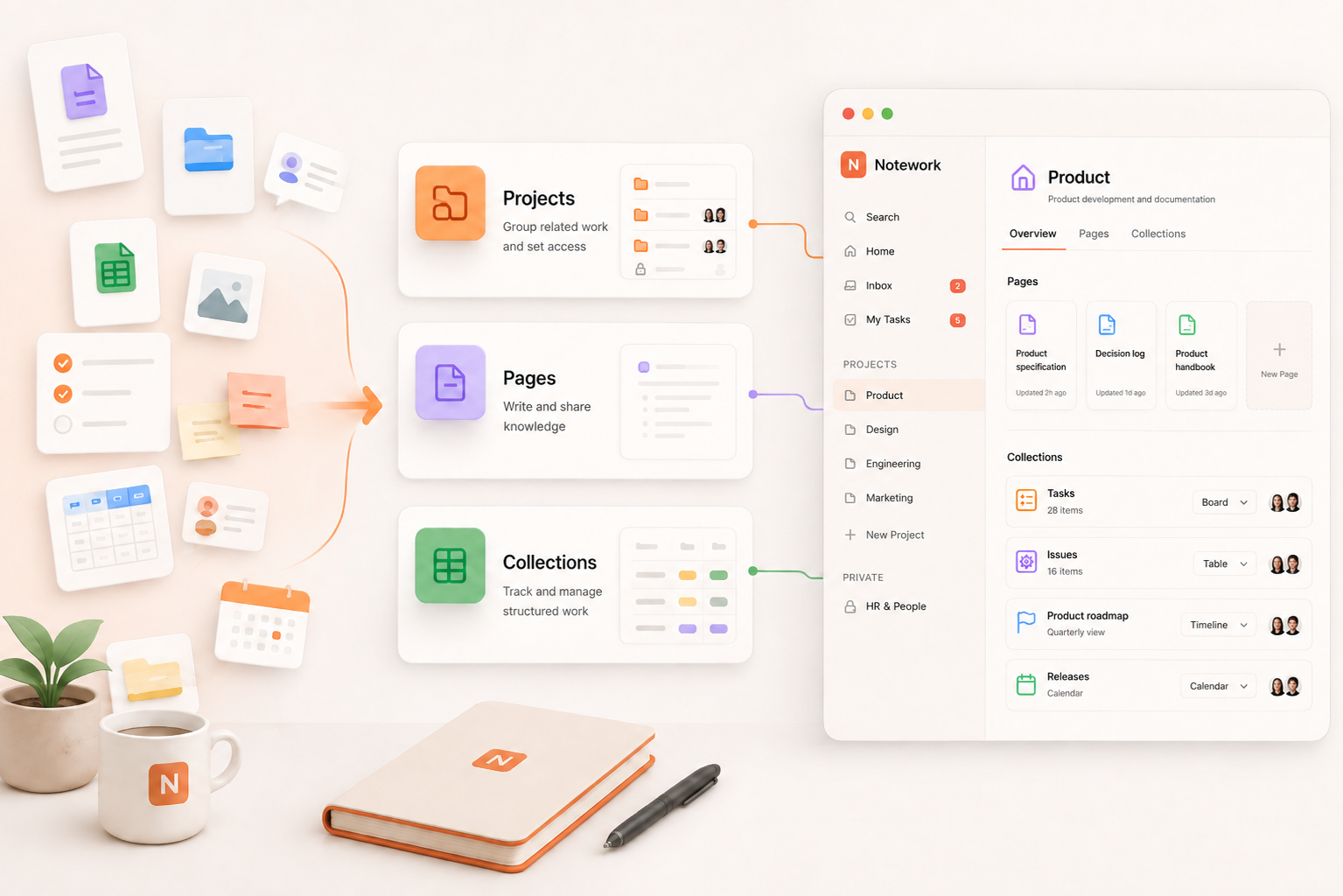
Notework uses three main building blocks for different kinds of work.
A Project gives related work a home within the workspace. It can group work for a product, team, client, initiative, or other workstream.
Pages hold written knowledge such as project briefs, specifications, meeting notes, product documentation, and decisions. Pages support comments and version history, so the document and its ongoing context can stay together.
Collections handle structured work such as tasks, issues, roadmaps, calendars, and other operational work. Collection items can include information such as an owner, status, priority, and due date, and the same Collection can be viewed as a table, board, calendar, timeline, list, or gallery.
For example, a product specification can live in a Page within a Project while a Collection in the same Project tracks the work required to deliver it.
Notework Collection entries also open as full Pages. That means an individual issue can keep its discussion, decisions, files, ownership, and other context with the tracked item itself.
The underlying idea is simple: written context and changing work can live together without needing to use the same format.
Good documentation should make a project easier to understand later
Project documentation doesn't need to capture every detail of the work.
It needs to preserve the information people will actually return to.
Give the project a clear home. Keep important context in durable places. Separate documents from tracked work without disconnecting them. Maintain one useful version of important information. Archive what is finished without throwing away context that may still matter.
A good structure should help someone open a project months later and understand what the team was trying to do, what decisions were made, and where to find the information behind them.
FAQs
What should be included in project documentation?
Project documentation should capture the information people need to understand a project and the decisions behind it. Depending on the project, that might include a brief, specifications, research, plans, meeting notes, decisions, and reference material.
Tasks and issues can sit alongside that documentation as tracked work rather than being treated as documents themselves.
How should project documentation be organized?
A useful approach is to give the project a clear home and organize information by purpose. For example, planning, research, decisions, working documentation, and reference material can have predictable places within the project.
The specific categories matter less than making the structure easy for the team to understand and maintain.
What is the difference between project documentation and project tasks?
Project documentation explains context, intent, requirements, research, and decisions.
Tasks and issues track work that needs to happen. They often include changing information such as status, owner, priority, or due date.
Most projects benefit from keeping the two connected while using appropriate formats for each.
How do you keep project documentation up to date?
Update documentation as part of the work rather than relying on occasional large cleanups. When a meaningful decision changes a plan or specification, update the relevant document. Capture important decisions while the context is still fresh, and avoid creating duplicate versions when an existing document can be updated.
How do you organize documentation for a completed project?
Completed projects can be archived while preserving information that may still be useful, such as final specifications, project briefs, research, decisions, and conclusions.
Archiving is also a useful time to remove obsolete drafts or duplicates that no longer provide useful context.
How does Notework organize project documentation?
In Notework, Projects provide a home for related work. Pages hold written knowledge such as specifications, notes, and decisions, while Collections handle structured work such as tasks, issues, roadmaps, and calendars.
This lets documentation and tracked work stay within the same project while retaining different roles and formats.