
Issue Documentation: What to Record Beyond Status and Assignee
Updated Oct 14, 202610 min read
Issue documentation is the record attached to a tracked product, project, support, or operational issue. It explains what happened, what the team checked, what they decided, and how they confirmed the result.
A useful issue record has two layers:
Consider a broken customer approval flow. A tracker might show that the issue is high priority, assigned to Maya, and in progress. That still leaves important questions unanswered. Which approvals failed? Who is affected? What has the team ruled out? How will anyone confirm the fix?
The fields help Maya find and manage the issue. The page helps Maya understand and resolve it.
An issue report is a structured document that captures a problem or obstacle arising during a project. Issues often arrive through messy channels: a Slack message, a screenshot, a support conversation, or a sentence mentioned near the end of a meeting.
Status and assignee answer two operational questions: where does this stand, and who owns it? They do not preserve the full working history without becoming difficult to use.
Use this split:
Trying to squeeze both jobs into properties creates a tracker with dozens of columns and mysterious dropdowns nobody remembers adding. A 47-column tracker is technically organized. So is a junk drawer with labels.
Start with the details people genuinely use during review:
Depending on the work, the affected area or issue type can use a Select or Relation property. The Issue Tracker preset can provide a starting structure, and teams can keep only the properties they actually use. Status, Person, Date, Select, Relation, Files, and URL are all useful property types in the right context.
Add a property because it supports a decision. If nobody filters, groups, assigns, or reviews by it, remove it.
Someone who was not part of the original conversation should be able to open the issue, understand the problem, follow the investigation, and see why it was closed without reconstructing last Tuesday from chat history.
That does not require a novel. It requires the right details in a predictable place.
Start with a title that names the failure. “Approval issue” says very little. “Customer approval requests remain pending after approval” gives the reader somewhere to begin.
The opening section should cover, briefly:
Separate facts from assumptions. “Approval emails were delivered, but the request remained pending” is an observation. “The email provider failed” is a theory until somebody checks it.
Keep the evidence required to evaluate the issue with the record. That may include screenshots, files, customer examples, source messages, or links to the relevant project brief. For advice on keeping that surrounding material usable, see how to organize project documentation.
For a repeatable software problem, write the reproduction steps and relevant conditions. For an operations issue, record the circumstances instead: which form was used, which approval path applied, or what happened immediately before the failure.
Do not force reproduction steps onto every issue. A confusing policy, missed handoff, or one-time supplier problem may not reproduce neatly. Record whatever conditions will help another person understand or investigate it.
Add findings as the work proceeds. Short dated updates usually work better than rewriting the whole page every time the theory changes.
Record a rejected explanation when it will prevent repeated work. “Confirmed that approval emails were delivered” may save a future teammate from spending an afternoon checking the mail system.
When the team chooses a response, document the choice and any meaningful limitation. For example:
We will correct existing pending requests and change the approval rule. We will leave the older reporting view unchanged because it does not affect whether approvals complete.
That note preserves the boundary of the decision. A later reader can see what was deliberately left out instead of treating it as forgotten work. For more guidance, see how to document decisions so your team can find them later.
Before closing the issue, record:
“Fixed” is a status update, not a resolution note. “Updated the approval rule and confirmed that new and previously pending requests now complete” gives the next reader something they can evaluate.
The immediate issue can close while improvements remain open. Turn those improvements into named follow-up tasks rather than keeping the original issue alive forever.
Use these sections selectively. A typo needs a clear description and a verification note. It does not need an investigation diary.
Properties
- Status:
- Priority:
- Assignee:
- Due date: [when meaningful]
- Affected area:

Summary and impact
What happened? What should have happened? Who or what is affected?

Evidence and links
Screenshots, files, examples, source messages, and related pages.

Conditions or reproduction steps [optional]
What conditions produced the issue? Can someone reproduce it?

Investigation log [optional]
Dated findings, tests, and explanations ruled out.

Decision and tradeoffs [optional]
What response was chosen? What was deliberately left out?

Resolution and verification
What changed? How was it checked? Are any limitations left?

Follow-up [optional]
Related issues, tasks, process changes, or durable documentation.
Documentation depth should follow impact, ambiguity, recurrence, and handoff risk.
A small copy error with an obvious correction may need one sentence, an assignee, and confirmation that the published text was checked. A recurring approval failure affecting customers deserves evidence, investigation notes, a decision, verification, and linked follow-up.
Write more when the issue is hard to understand, likely to recur, or likely to change hands. Write less when the cause and correction are obvious. Nobody needs a postmortem for a misplaced comma.
Put investigation updates and comments beside the relevant part of the issue record whenever possible. A question about a screenshot belongs with the screenshot. A disagreement about a conclusion belongs with that conclusion.
Some discussion will still happen in meetings or chat. Bring the useful result back into the issue: the answer, decision, new evidence, or assigned follow-up. Copying an entire Slack thread usually preserves more noise than knowledge.
A shared known-issues record can collect recurring problems for later troubleshooting. People can check whether a symptom has appeared before, which conditions were involved, and what workaround or resolution was used. A title marked “Done” is rarely enough.
Imagine a support team reports that approved customer requests remain pending.
Triage properties
| Property | Example value |
|---|---|
| Status | Investigating |
| Priority | High |
| Assignee | Maya |
| Due date | Friday |
| Affected area | Customer approvals |
Issue entry page
Summary and impact
Customer requests remain pending after an approver selects “Approve.” Support has received examples from affected customers. The approval email arrives, but the request status does not change.
Evidence and conditions
Attach the support examples and a screenshot of a pending request. Link the approval-process page. Note that the reported examples use the same approval path.
Investigation log
Approval emails were delivered, which rules out the original mail-delivery theory. The affected requests share an older approval rule. Newer rules complete as expected.
Decision
Correct the older rule and update existing pending requests. Track a review of other older approval rules as separate follow-up work.
Resolution and verification
The rule was updated. Support confirmed that a previously pending request completed, and a new request using the same path was approved successfully.
Follow-up
Create a task to review other approval rules created under the older setup.
The properties made the issue easy to review. The entry page preserved the material needed to understand and close it.
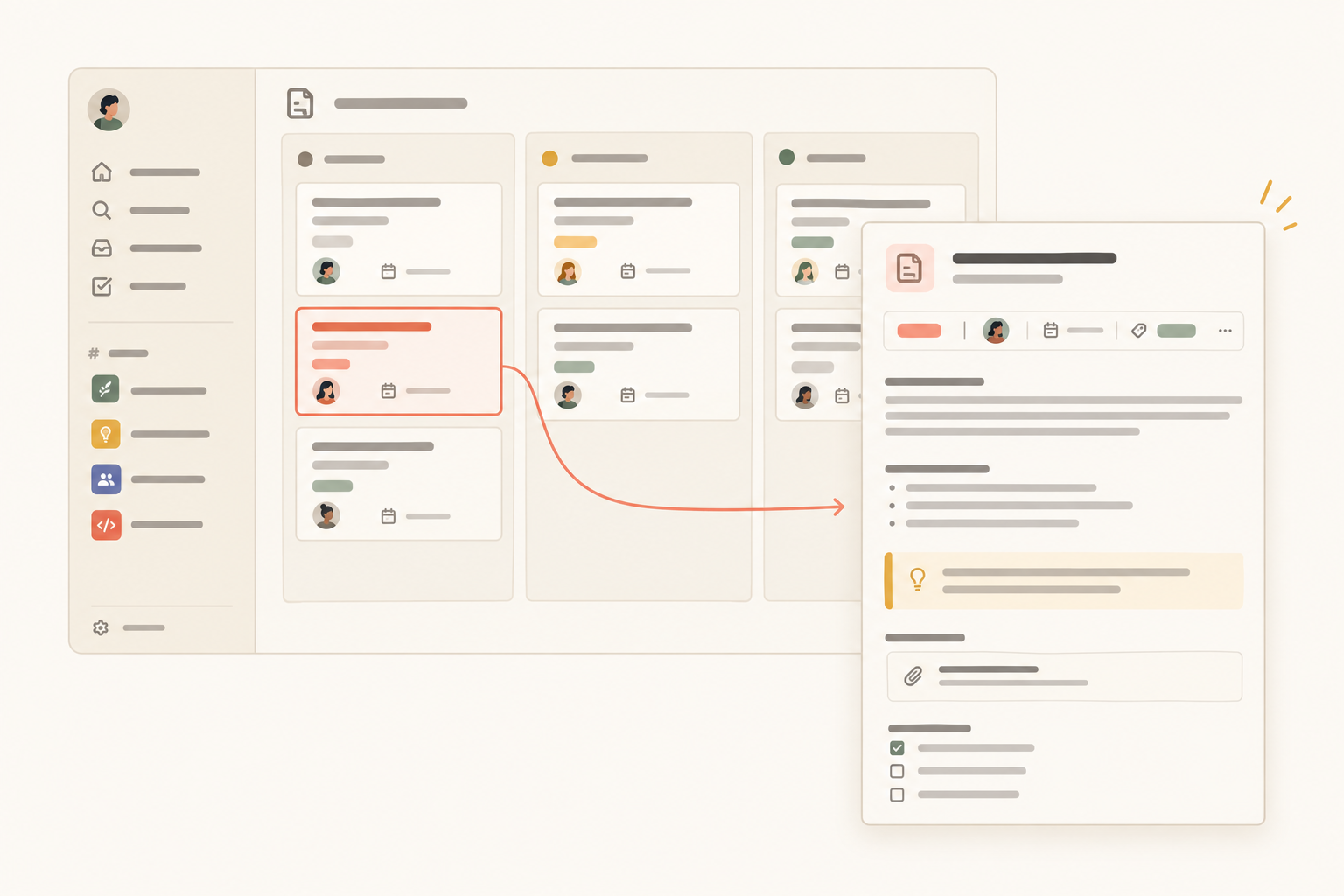
Notework’s model makes the two-layer workflow explicit. A workspace contains projects, and every page and collection belongs to a project. Start with the Issue Tracker collection preset inside the project where the issue belongs.
A collection is a structured set of entry pages with typed properties. Each issue can carry its triage details and open as a full page for the working record. Use the preset as a starting point, then keep the properties that help your team review issues. Status, Person, Date, Select, Relation, Files, and URL can support different parts of the triage workflow.
The issue page can hold the summary, evidence, investigation notes, decision, resolution, and follow-up links. Notework pages support nested pages, mentions, backlinks, and comments anchored to specific blocks. A teammate can discuss a screenshot, finding, or resolution statement without leaving a vague comment about the whole page.
Saved Table, Board, List, Calendar, Timeline, and Gallery views are different ways to review the same issue entries. A board might group issues by status, while a table shows assignee and priority. The views do not split the issue history into separate datasets.
When an investigation creates concrete follow-up work, the Task Tracker preset can keep those actions near the documentation that explains them. Why Docs and Tasks Should Live in the Same Workspace explores that relationship in more detail.
Search combines exact matching with semantic retrieval, and results are limited to content the person can access. That gives teams another way to find documented issues by title or by the language used to describe the problem.
This is a focused workflow for small teams that want documentation, projects, tasks, issues, and structured information in one more opinionated workspace. It is not a claim of Jira or GitHub feature parity. The point is to keep the issue and the context needed to resolve it together.
Keep the active history in the issue entry page. Create or link a separate page when the material must make sense independently of that one problem, such as:
The issue remains the history of what happened. The separate page becomes the maintained guidance. Link them instead of duplicating both and hoping future edits reach the right copy.
The same boundary applies to follow-up work. Keep the task connected to the issue and the durable context that explains it.
if you want to pair an Issue Tracker collection with full entry pages for the evidence and decisions behind each issue. Every new workspace starts with a 14-day free trial with Team-level access.
See also how to organize project documentation.
See also what to include in a project overview.