
Project vs. Task: When Does Work Deserve Its Own Project?
Updated Sep 24, 20269 min read
A launch initiative may deserve its own project. Approving the launch email probably does not.
The difference is not mainly duration or task count. Work deserves a project when people need a durable home for a shared outcome, its context, and the related work needed to deliver it. A clear action that already has a suitable home should stay a task.
A task is a specific unit of work. A project is related work organized around an outcome. That common definition is useful, but it leaves out the question teams actually face: where should the work live?
A practical planning lens is:
Tasks are often shorter-term and projects often last longer, but duration is only a clue. A two-week, cross-functional launch may need a project. A months-long report may remain one task inside an established operations project.
The useful distinction is whether the work needs its own shared context. Someone approving an email needs the latest draft and a deadline. A team launching a product may need a brief, decisions, owners, supporting pages, tasks, and issues.
Keep work as a task when it has:
“Launch email” is vague. “Maya approves the launch email by Thursday” is a task. It says what needs to happen, who owns it, and what completion looks like.
That task belongs in the existing product-launch project if the project already explains the audience, draft, deadline, and purpose. Creating an “Approve launch email” project would give one action a boundary it does not need.
A substantial deliverable can still be a task. Sam might spend two weeks writing an implementation guide for an established customer-onboarding project. If the guide inherits its purpose, audience, and decisions from that project, it can remain a task there.
Create a project when a meaningful outcome needs somewhere for people to return to during the work.
Consider a small pricing-page launch. It may involve only a product lead, designer, and marketer for two weeks. They still need a brief, approved copy, design decisions, launch tasks, and a place to track problems found during review. That is a project because the shared context matters, even though the schedule is short.
A useful project might contain:
A teammate should be able to enter the project and understand what is happening without reconstructing it from six Slack threads and somebody’s memory. See what to include in a project overview for a practical starting point.
Before creating a new project, ask:
Does the work have a meaningful shared outcome?
“Publish the spring campaign” is an outcome. “Review the campaign headline” is an action supporting it.
Does delivery require coordination?
Several contributors may need a shared place for ownership, handoffs, and current decisions. A solo owner can still need a project if other people review or rely on the context.
Does the work need its own supporting material?
A separate brief, research, decision history, or body of working material is a strong project signal. If that context already lives in another project, a task there is usually cleaner.
Does related work need to stay connected?
Several tasks do not automatically make a project. Look for pages, actions, and issues that become easier to understand when kept together.
Will people revisit the context until the outcome is delivered?
A project does not need to last forever. Its home only needs to remain useful throughout the work.
Several strong “yes” answers usually justify a project. A specific action that inherits its purpose and context from existing work should remain a task.
A short, cross-functional launch may deserve a project because people need one home for the brief, approvals, tasks, and launch issues. “Prepare the annual insurance renewal” may remain one long-running task in an established finance operations project.
Task count is just as unreliable. A project can have a few tasks, or even one substantial task, if the outcome needs its own brief, decisions, supporting pages, and shared review history. The project boundary organizes the context. It does not exist to satisfy a checkbox quota.
If a proposed project contains one action and no distinct context, it is probably a task. If it contains dozens of unrelated actions, it may be a catch-all project wearing a project-shaped hat.
Sometimes work has been classified incorrectly before the project-versus-task decision even begins.
Use a page for written context or a standalone document. A launch brief, meeting note, or decision record does not become a task unless someone must take a specific action around it.
Use an issue for a problem requiring investigation or resolution. “Checkout fails for customers using a saved card” describes a problem. A follow-up such as “Priya verifies the fix in staging” is a task. For the deeper distinction, read Task vs. Issue: What’s the Difference?.
Recurring work often belongs in an ongoing operational project. A marketing team publishing every week probably does not need a new project for every newsletter. A standing content-operations project can hold the calendar, drafts, approvals, and related tasks while the shared context remains coherent.
Create a separate project when a recurring stream produces a distinct outcome with its own context. A major rebrand campaign might qualify. Thursday’s newsletter probably does not.
Approve the launch email: Keep it as a task inside the current launch project. The project already supplies the audience, draft, deadline, and owner.
Launch a referral program: Make it a project when product, marketing, and operations need a shared brief, decisions, supporting pages, tasks, and issues. A short schedule does not remove the need for that shared home.
Fix a checkout bug: Track the bug as an issue inside the relevant product project. Add a task for a concrete follow-up such as verifying the fix in staging.
Write the onboarding guide: Keep it as a task when it is one deliverable within an existing onboarding project. Give it a project only when it develops a separate outcome and enough context or coordination to justify the boundary.
Publish weekly marketing content: Keep the repeatable work in an ongoing marketing-operations project. Creating a new project every Monday would scatter the calendar, process, and decisions across dozens of tiny homes.
Creating a project for every request fragments related context. Search fills with nearly empty projects, and nobody knows which home contains the useful information.
The opposite mistake is the immortal “Company” project. It collects recruiting notes, product launches, office information, campaign tasks, and a mysterious checklist from two years ago. Everything is together, but very little is findable.
When an outcome has been delivered, stop treating that project as active work. Keep an ongoing project only while its purpose and shared context remain clear. If it starts collecting unrelated outcomes, separate those outcomes into sensible boundaries instead of adding another section called “Miscellaneous.”
For broader guidance, read How to Organize a Team Workspace That Stays Organized.
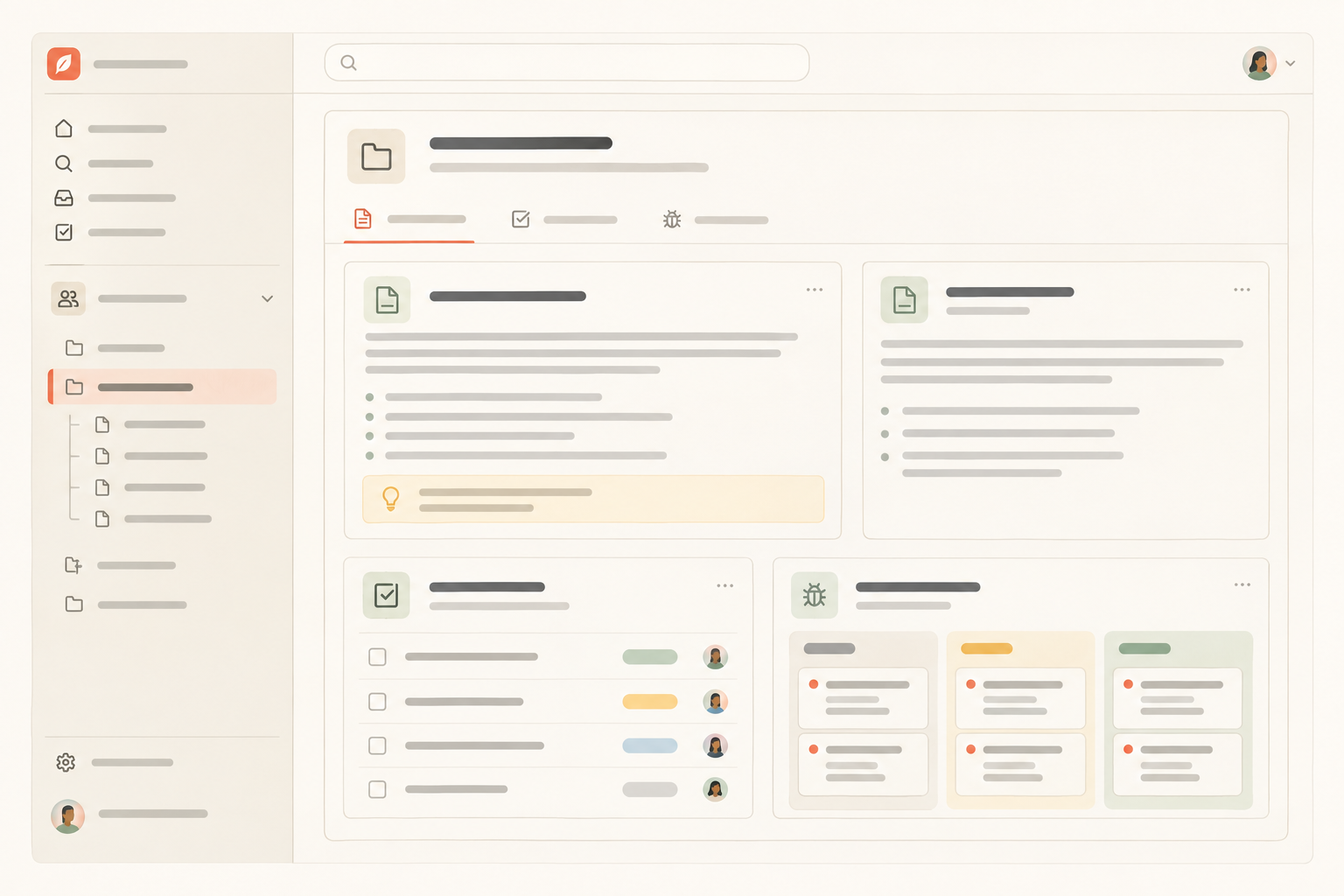
Notework makes the durable-boundary test concrete through a simple structure: Workspace → Projects → Pages and Collections. A workspace contains projects, and every page and collection belongs to a project. Each project has a home.
That means the project is the place for a shared outcome and its context. A page can hold the brief or decision history. A collection can organize repeatable work as full entry pages. A task or issue can remain connected to the project instead of becoming a separate, context-free item.
For a product launch, a Notework project might contain:
Notework pages support nesting, mentions, backlinks, and comments anchored to specific blocks. That gives the team a way to keep discussion attached to the relevant part of a brief or decision page.
The Task Tracker and Issue Tracker presets keep actionable work beside the documentation that explains it. Each item is a full entry page, so a task or issue can carry supporting context beyond a title and status.
Collections are structured sets of entry pages with typed properties. Saved Table, Board, List, Calendar, Timeline, and Gallery views show the same entries from different angles. A launch team can review status on a board and due dates on a calendar without creating separate sets of work.
This model also gives the boundary test somewhere to land. Small actions stay inside the relevant project. Distinct outcomes get a project home. Pages explain the work, and collections organize repeatable tasks or issues. The structure helps avoid both tiny-project sprawl and one project that tries to contain everything.
If a meaningful shared outcome needs a home that people will revisit for context and coordinated work, create a project.
If the work is a clear next action that advances an outcome with an existing home, create a task there. Use a page for written context and an issue for a problem that needs investigation or resolution.
If you want to apply that structure in one workspace, try Notework with a 14-day free trial. Every new workspace starts with Team-level access during the trial.
See also how to organize project documentation.
See also how to document decisions so your team can find them later.
See also why docs and tasks should live in the same workspace.